So in this assignment i was asked to draw a concept art character and study the characteristics of people around me to push their charcateristics to create a stylistic, exaggerated, character concept.
This is suppose to be first of many and hopefully we will see some improvements in future. I'm just glad i don't have to draw glasses and cups with reflections anymore :)
So this is what i got so far with sketches ive done alot research and got a lot pictures which will be useful later on.
This is just the rough version of the character its not entirely finished but this is what i got i had to cut out some of the initial Armour i was thinking about to put on the character do to time issue. Most of the stuff is finished it just needs a polish!
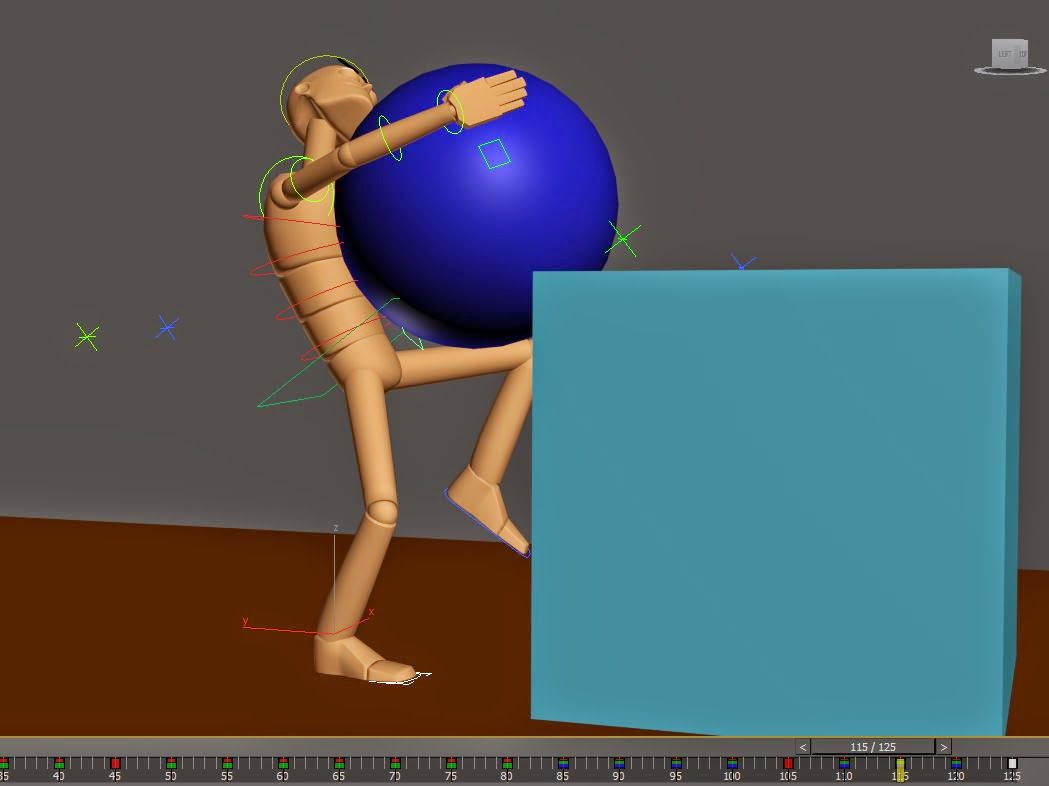
In this project we were asked to duplicate our Lift assignment and try to do it better and use some of the tools we didn't last time. The assignment was really simple make a character lift a spherical object and show that it's heavy without using the facial control in other word without showing emotional expressions.
Phase 1:
I started with looking over my old work from the assignment to see where i could push little bit more and see if i could get it right this time. I used some of the old files from assignment as example and i also wrote down some guidelines to follow. I encounter several problems along the way with the animation which I kinda fixed as good as I could.
I used the sketches from old assignment as example but i didn't follow it to the letter thou, when it came to animating I started off good but for some reason i had problems with the walk cycle. Tried to fix it in curve editor with adjusting the flow however i feel like the animation was too fast especially in the end of the animation. Also i choose to use 5 frames keyframe format cause i felt like that would work but now im starting to think maybe I should have put 10 frames instead. And if I ever do this or something like this again I think I will do it differently.
Phase 2:
When i finished with animating i started going through my animation and i notice it was very "spikey" like flow was at times popping and i remember my other teacher was talking about this and that this is something you should avoid having. This is where Curve Editor came in handy I mean it's still not good but it's much better then what it was. I started going thought the tutorial videos that Noroff had on their site to see if i might have forgotten something or maybe try out to fix some of my already existing problems. I cleaned out as much i could in curve editor but i doubt it was enough cause i was going through others work and they had a much cleaner animation which only means one thing and that is that i didnt use enough time in Curve Editor. Also saw that some people use inbetweeners to fix some of their problem they couldn't in Editor which i tried too. However i started getting more problems when i tried to adjust and smooth out the animation in editor i think i did something i shouldn't. Suddenly it was just getting worse so i just went back and let that one go i had couple tries but i just couldn't figure out what i was doing wrong.
Phase 3:
Last part smoothing and editing the flow which i did but i wasn't so happy with it, like i said earlier i felt like the animation was too fast and i tried to slow down the part where the character was lifting the object. Just to give it more appeal or a sign that object was heavy but i think that it wasn't enough should probably have done it much more.
I also noticed that in the beginning of the animation just before the character is about to get in place to lift the object when he steps forward his back foot is hitting the floor and sliding. Which means its connecting to the ground before the animation is executed and i tried to fix this but i couldn't figure it out. I had this same problem before and i asked for help about this and i though i understood it but apparently not. Also in the end where the character is lifting the object i slowed down the animation in Curve Editor so it shows that the object hes lifting is heavy, I also animated that hes using one of his legs to lift the object simple cause it would indicate that object was heavy which was the point of the whole project.
Evaluating
I feel like i could have done so much better with this project it started off really good for me and im just a bit dispointed in the end. Cause i felt like i had everything under control but when i came down to editing and polishing the project it was a problem after a problem. I fixed one thing two other issues pop up and it gonna take some time before i get entirely used to Curve Editor. It wasn't all bad i mean last time i barely touched Curve Editor this time i actually did something and fixed some of the issues. However it is far from perfect which only means that i gotta work more with it and get used to using it.
The project it self was fun i enjoyed working it didnt take me as much time to do the project as the assignment even with being behind couple day cause of a misunderstanding. Atleast next time i will be more prepared and hopefully by that time ive mastered the Curve Editor to some degree. The tutorials on the website were of great help solved couple of my issues like i mentioned before.
In this assignment we were asked to download one of the Max Rigs then go on Internet and find fascial expressions and try to replicate them with a Max Rig. I downloaded the Max Rig not the lowmax one and i noticed that it was missing couple controllers like one for eyebrow's wasn't working and also there were no controllers for eyelids. So considering this some of the expressions are a bit weird didn't really get them to line up the right way but i had to improvise with what i had.
*NOTE
The creator of the Rig stated that the Rig is fully functional however you shouldn't merge the file with an already existing scene due to the problems with IK name etc etc. However i did this when i was animating the lift clip and for this assignment i opened up a fresh file so i don't know how the problem persisted. I deleted the scene and the Rig thinking it might have affected the Rig file it self so i downloaded a new one but its the same thing there. Think next time i do this im just gonna download the LowMax Rig instead.
onsdag 21. januar 2015
Digital Acting
Part 4
In this assignment we were asked to go back to our previous assignment and give it another look after reading about poses and watching Keith Lango's video. We were suppose to try and improve the poses in the existing animation but first start off with noting down some of the idea's how to improve the poses make them more convincing.
Blocking Animation:
So far what ive learned is that my poses are quiet robotic like it just lacks the personality. You can clearly see what hes doing but you don't see a trace of human "expression" you might say. Like the sphere suppose to be heavy and you can't see anything here by looking at my pictures that would suggest or hint that the object is heavy. Also one thing i forgot to type down on the picture is by making his legs quiver while hes lifting the object that would give you some information about the object and the character giving it more personality.
In this assignment we were asked to document every part of our Animation method so the teacher's know what experience everyone is on and basically polish our skills here and there.
And it's not just to show others but also your self and maybe after a while you can come back and look how far you've come. Since this is an online course you might say, you would want to put up a schedule to keep up a track on the time for the longer assignment or projects. My self like a lot other people tend to get too much into details and lose track of time making a hell for myself in the end of the projects and assignment. So for that simple reason i always start with a plan and work from there and usually i end up with some extra time to give my work extra touch here and there. Since this isn't an actual project where we have to do into all godly details from scratch i'm going to leave out details like creating 3d figure and how to put in bones etc. I'm going to start of with the planning...
The breakdown:
Organize
Research
Executing sketching/blocking/animating
Tweak/Polishing
Documenting
Research:
I've gone through some of the forum posts, blogs just to get an idea how those before me have done it and it's nothing out of the ordinary. So i started with checking out some heavy weight lifting animations on YouTube for starters and from there i tried to find a real video of a human lifting a spherical object and this is where i found this video which is perfect. The guy explains pretty much everything in detail how to pose and how to lift the object correctly. But i didn't stop there so i went on Google to search up some lifting poses that were drawn and i found this picture which is perfect cause it fits this guys video it's the same lifting method. Saw that others used the same example for their assignments i appreciate the guy who pointed out this video it just brilliant!
Anyways these are few of example pictures i found on Google that i would use to make a smooth flow of animation if i had to make a rendered out version.
This picture show exactly the same lifting method as in the video above perfectly showing the executed lifting loop. However i don't think i would have used all of those frames, well it depends on really how detailed you want the animation to be really. If this was a project i would definitely use all frame but also put in in between's to make it even more smoother.
Next picture shows pretty much the same thing except it's with a rigged standard dummy which i actually think might be from an old student. Not entirely sure, i got it while i was searching on Google but that's what the internet is for right?
I've seen previous students use Digital Tutor and they stumbled on same issue as me. Most of the stuff is either in Maya or some other programs i don't recognize. When it comes to Maya it's pretty close to 3D Max but since i don't have the access to Digital Tutors i had to use Lynda. And that's where i had a problem cause a lot of the tutorials over there are simply in other programs that are different if you compare it with 3D Studio Max so i had to find my way on YouTube.
Sketch:
Back to the Sketches, i did my research that i needed now it was time for the animation it self. I've made a Sketch which i was going to follow or should i say use as and example for my animation more or less.
Blocking:
These are the keyframes for the lifting cycle from my Animation i didn't follow my Sketches entirely to the point however i just went with it and the flow/timing was not that bad considering i hardly touched Curve Editor.
Tweaking: This is how my Timeline looks like, I tried to tweak or adjust the animation with inbetweens so the timing in the animation was a bit smoother.
I barely adjusted anything in the Curve Editor since i don't remember much about it!
Conclussion:
Animating is a struggle for me to a small degree, but the worst part for me is "fine tuning" the animation fixing the timeline in Curve Editor. In order for me to progress in this area i simply have to work more on my Animation timing in the editor. I feel like i'm just making it so much harder for my self when it comes to editing in the Curve editor. It's blank page for me even in the past I struggled a lot with it, haven't done much in it this time.
Must say, my Curve Editor looks awfully alike London Underground system definitely need to work more on it. I have been trying to look up tutorials on YouTube found couple of them which might help me in the future. I'm also trying to get my hands on couple of those books but it seems the only way to get them is by ordering online.
Anyways to summarize the assignment first thing i did was to put up a plan and get familiar with the assignment. When that was done i went on the internet and researched as much as it was needed in order for me to start on the Sketches. Once i sketched out my animation and had a decent storyboard i could follow i started on the Animation. When the Animation was finished the only thing that was left was tweaking and adjusting the timing on the Animation.
Part 02 Storytelling Poses
Picking out the Keyframes:
To start of what is a keyframe you might ask?
It's a drawing that defines the beginning and end point of a smooth animation or film transition. Those drawing are called "frames" cause of their position in time is measured in frames on a film strip. Sequence of key frames defines movements that the viewers will see on a film, video or animation defines the timing of the movement.
In this assignments we were asked to either study the GIF animation above or any of the other animation clips below and pick out the keystory telling poses. I however choose to go with this Wolf/axe animation which is from the book "Illusion of Life: Disney Animation" which is written by Frank Thomas and Ollie Johnson while the drawing is by Fred Moore. Since i don't have the book i had to study the GIF and the collection of images really closely for the keyframe.
Sequence:
I have crossed of the poses that i think are the Keyframes and put a number in which order the whole animation cycle goes, not entirely sure its 100% correct thou. One of the main "tell tale" signs you might say is in the word it self "keyframe (key storytelling pose)" the pose thats explain the action the most. I don't know how to explain it detailed but if you study the sequence you get a hunch what are the keyframes. Most likely some of my keyframes are wrong since ive seen couple other students with different keyframes maybe not. I felt pretty sure that the ones i picked were the right ones.
As for the sequence i have put up numbers in which order i think it goes, studied the GIF and the sequence and i can definitely tell you that the collection of the picture are not in correct sequential order. I'm not sure mine is either to be honest but ive tried and i found out that the hat on the character was quiet helpful it could tell you what the next motion was kinda.
Methods in context:
So going through other students work i'm not that far off i can definitely see some resemblance here and there. The animation keyframes are different from student to student, take for example my keyframes i have positioned them in fives but i have also put keyframes here and there where i felt like the poses needed to be more visible or kinda explain the situation better. Also i gave the animation smoother transitions with inbetweens which helped cause i basically didn't use Curve Editor that much.
Some students counted the key positions in thirds and fives like previous students mentioned while there were some who didn't do that at all and just put the key's where they felt like it should be. In the future if i work with a group i will have to do this better cause my keyframes on timeline were chaotic and when i tried to smooth the transitions in Curve Editor i was just overwhelmed by the graphs i was getting. I don't know i was basically also looking at what other did before me and i think that made me start second guessing my self. Probably should have ran with my own thing and hoped for the best cause in the beginning i was quiet confident that i was doing it right. I mean even back when i was at Noroff we were keyframing on every five frames.
Further on ive also seen people used the stepped mode and some were using linear method to adjust timing on their animation which just made their animation much smoother. I didn't use this but next time i'm going to cause at the moment im pretty much clueless when it comes to the Curve Editor.
There was also some difference in how people started to animate and how they excuted the whole thing, like there were some student who animated in the keyframe positions and then they animated in the inbetweens. Which was then again followed by editing in the Curve Editor and in the end one last polishing touch to finishe it all off. I was doing a pretty similar technique except i did it all in one go. I didnt animate the keyframe first but i did everything at same time and then when i felt like that transitions had to be more smoother i put in more inbetweens. I wasnt too happy cause i wasn't done by that i mean i should have gone through it with Curve Editor to give it last touches.
Anways to end this i would just like to say that my current problem is the Curve Editor i just don't know it enough to put it to good use. I'm going to read up on it and see if the tutorial videos i found help out so next time we do this again i can try out the Curve Editor.
I have to say that this is the first time i encounter this type of animation so my first reaction would be somewhere along the lines of art that's the first thing that pop's in my head.
For some reason i don't like it and i find it pretty annoying to watch maybe that's the whole point of it, who knows?
Like i said this is the typical type of animation you would expect to see in Art galleries cause it would only appeal to certain type of people not everyone would enjoy this. And its because of the style its kinda rough and more appealing to adults you might say.
Fantasmagorie 1908:
This reminds me of some of the early Disney cartoons, i have also seen it in like old movies about the 1940's and they show this kinda of stuff in theaters. Should also mention animation documentary ones that show how it all started this is kinda like the start of animation age you might say!
I liked this little animation movie cause it shows how people use to make animation back in the old days and how its not so different from how we do it today. The progress going from a drawing board everything is the same the quality and executing the animation might be different. But before you can start making stuff in 3D programs you still have to draw the story-line on a drawing board.
Type of this animation is mainly seen in documentaries about cartoons or in old animation movies from the 1900. I mean its not steamboat Willie either but it's even earlier then that. So you would expect finding this in old movies, documentaries about how it all started or even in a cartoon/animation museum, i wouldn't be surprise if you found something like this in Disney's museum.
Cafe Serre 2009:
Typical student movie i can definitely relate to this type of short movies as made couple of those myself in the past.
Funny short animation film with a good pace i liked it, was well execute and the quality is pretty good. Only thing i would complain about are the facial expression of the cop character, which are pretty minimal in this movie. They should have gone and overdone it as these animations films are much better and more clear to read when characters expressions are more shown. But i mean i wouldn't down-rate it just cause of that it was still funny but if they wanted to adjust it abit more the facial expressions would be the cherry on the top.
You would expect to see this type of animation movie on the internet or on TV (if it was longer) but this is typical student work cause of it duration. The quality it self is pretty good which would make it TV worthy it's funny, colorful and non-violent which makes it perfect for kids. And i wouldn't hesitate to say that it would appeal to grown ups even.
Pocoyo 2007:
This is the same kinda type of animation as Cafe Serre except this is clearly a studio produced animation movie made for kids. There's no doubt about that this belongs on TV and i have seen couple of similar animation movies like this could mention that its become more and more popular. You barely see any of those drawing animated movies anymore like Lion king or Atlantis now it's all about Shrek and Ice Age type of animations.
Pocoyo was okay nothing to like or dislike since i don't any interest in these types of animated films there is just one thing i dont get and thats the human character. Why does he keep on jumping on his head i mean this show is made for kids, why would you give a kid the idea of jumping on his head?
Context of this animated film would be on TV like kid hour i don't know the right name since i barely watch English television. But it's main viewers would kid's even thou there are some sceens which i find pretty weird.
Cyber Evolution 2007:
Can't say for sure that i have seen anything like this before but i think i have seen something similar on TV, the intro of the TV show "Big bang theory" has this kinda a thing with human evolution. Which is kinda like this starts in same way and just keep on going to the final state, that's the first thing that came to my mind.
I have to say that i liked this short film the soundtrack was perfectly matched with the animation and the film it self was very fascinating. There's this artistic side to it and it kinda mesmerizes you can't really describe it better then that.
Have to say that this does belong in a Art gallery but it also would works as a really awesome intro for a TV show or something. It has this artistic side which is why i said it belonged in a art gallery but it also has this intro kinda feeling which is why it could also work as a intro for a computer science tv show.
Toyota / APT Prod. 2006
This is a typical animated commercial which you almost see daily on TV to make you feel good for driving a Prius and everyone who doesn't make them feel like crap.
I don't like commercial but then again i dont watch much tv, i mean who loves commercials in general unless its something about hot chicks or something funny? :) Anyways back to this commercial it's pretty good cause you clearly get the message from the commercial. I liked how they executed this commercial they knew what they wanted to focus on and they did so through the whole commercial and still got the message out to the audience.
Not much to say or debate here it's clearly TV material or maybe car shop.
Finding the connection
There is a clear relation between the short film "Cafe Serre" and the work i have done in the past while i was studying. We had this project can't entirely remember the name of it but it had something to do with police and gangsters. Thing that caught my eye in Cafe Serre was the fact that it was happening in a Cafe kinda like in our short film and it was the same quality similar characters. Also the fact that they didn't overdo the facial expression is also another thing which we did as well and then the teacher told us to make it more obvious.
The fact that its a student short film is another thing i can relate to, it doesn't matter if it's not perfect you learn from your mistakes i know we did.
Future 3D Film Production
This is what i had in mind as an example for a short film i wanna create something that either make people laugh or gives them goose bumps. This is what i want to aim for it doesn't have to be some studio quality short film, just as long i can do good animation and at same time bring the message to the audience. I've always loved making people laugh and that's just who i am a part of my personality and i want to have the ability to bring that into my animation!